ReadIN 译读:Zotero 里的论文,在 ReadIN 读
免费的 Zotero 插件。右键一篇论文,用 ReadIN 整页中英对照读、让 AI 讲这篇说了什么;高亮和想法自动回到 Zotero。文献不用搬家。
内测中:不用注册、不用填东西,打开 ReadIN 就自动配好;每月名额有限,领完了下个月再来。读论文、高亮、回到 Zotero 不用领也能用。
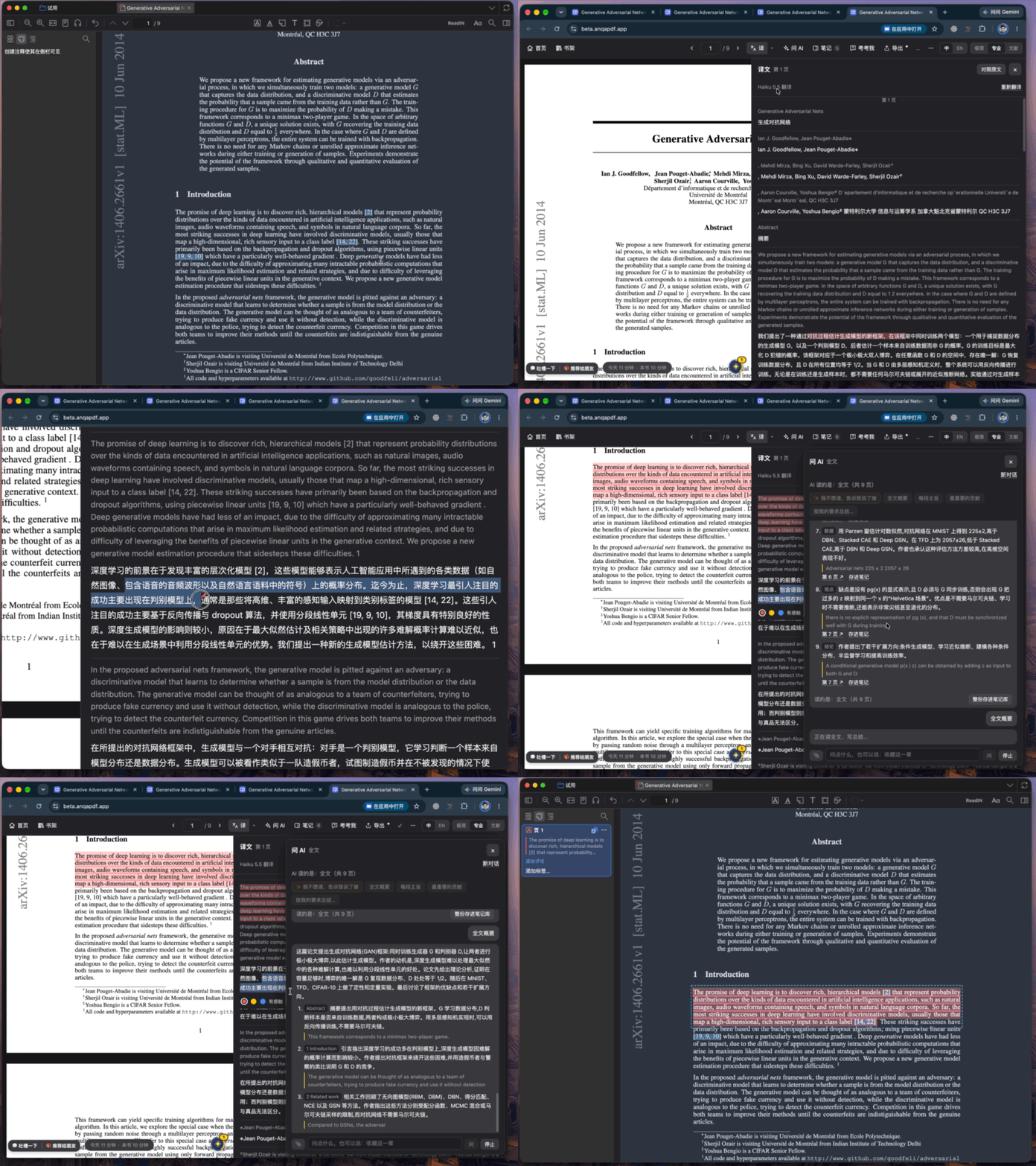
为什么用它
- 整页中英对照不用一句一句选。整页翻好,原文和译文对着读;在译文上划一句,原文里对应的那句也一起划上。
- 「我不想读,告诉我说了啥」一句话让 AI 讲清这篇论文说了什么,摘出关键观点,点一下跳回原文那一句。
- 不用自己弄 API 密钥不用去申请 OpenAI、Claude 的密钥,也不用填设置。内测期间点上面的链接就行。
- 导出思维导图AI 把你的高亮和想法整理成一张思维导图,能折叠、能「遮住回想」。
- 随时问 AI选中任何一句都能问:讲术语、拆长句、这一段在全文里起什么作用。
- 文献不搬家Zotero 照旧管文献和引用。在 ReadIN 画的高亮、写的想法变成 Zotero 自己的批注;AI 整理的笔记存成论文下面的一条笔记。
三步开始
- 下载插件文件 readin-yidu-x.y.z.xpi。
- Zotero 菜单「工具 → 插件」,把文件拖进去。
- 在 Chrome 里打开 ReadIN,右上角选「文献」,书架上点「连接 Zotero」。Chrome 问能不能访问这台电脑上的其他应用,点「允许」。
之后在 Zotero 里右键一篇论文,选「在 ReadIN 打开」;或者在 Zotero 的 PDF 阅读器顶栏点「ReadIN」。
要知道的
- 两边都要开着:ReadIN 和 Zotero 在你自己的电脑上直接连,不经过网络,所以要同时开着、在同一台电脑上。Zotero 里新画的高亮,下次在 ReadIN 打开这篇时带过来。
- 支持:Zotero 10;电脑上的 Chrome。
- 隐私:插件本身不连互联网,只回答 ReadIN 自己的网页;代码开源(GitHub),不混淆、没有统计。用 AI 功能时,要翻译或提问的文字会经过 ReadIN 的服务发给 AI。
- 收费:插件免费。ReadIN 正式版有免费额度,用得多可以升级(价钱)。
想聊聊
这个插件和 Zotero 官方没有关系。Zotero 是 Corporation for Digital Scholarship 的注册商标。
ReadIN for Zotero: read your Zotero papers in ReadIN
A free Zotero plugin. Right-click a paper to read it in ReadIN with a full-page side-by-side translation and have the AI tell you what it says. Your highlights and thoughts go back to Zotero, and your library stays where it is.
In beta: no sign-up, nothing to fill in. ReadIN opens with AI ready. Places are limited each month. Reading, highlighting and syncing back to Zotero work without it.
Why use it
- Full-page side-by-side translationNo selecting sentence by sentence. Highlight a sentence in the translation and the matching sentence in the original is highlighted too.
- “Tell me what it says”The AI explains the paper and pulls out key points; click one to jump to the sentence.
- No API keys to set upNo OpenAI or Claude keys, no settings. Use the link above during the beta.
- Mind map exportThe AI turns your highlights and thoughts into a foldable mind map.
- Ask AI anywhereSelect any sentence and ask: terms, long sentences, what a passage does in the paper.
- Your library stays in ZoteroHighlights and thoughts become native Zotero annotations; AI notes are saved as a child note.
Three steps
- Download the plugin file readin-yidu-x.y.z.xpi.
- In Zotero, open Tools → Plugins and drag the file in.
- Open ReadIN in Chrome, choose Literature at the top right and click “Connect Zotero” on the shelf. When Chrome asks about apps on this computer, click Allow.
Then right-click a paper in Zotero and choose “Open in ReadIN”, or click “ReadIN” in the toolbar of Zotero's PDF reader.
Good to know
- Keep both open: ReadIN and Zotero talk directly on your computer, not over the internet, so both need to be open on the same computer. Highlights you add in Zotero come over the next time you open the paper in ReadIN.
- Works with: Zotero 10 and Chrome on a computer.
- Privacy: the plugin makes no internet requests and answers only ReadIN's own pages. Open source on GitHub, no obfuscation, no tracking. When you use AI features, the text you translate or ask about goes to the AI through ReadIN's service.
- Price: the plugin is free. ReadIN will have a free tier with paid plans for heavier use (Pricing).
Get in touch
Write to [email protected], or use Feedback at the bottom left of ReadIN.
This plugin is not affiliated with or endorsed by Zotero. Zotero is a registered trademark of the Corporation for Digital Scholarship.