这个插件和 Zotero 官方没有关系。Zotero 是 Corporation for Digital Scholarship 的注册商标。
ReadIN for Zotero: read your Zotero papers in ReadIN
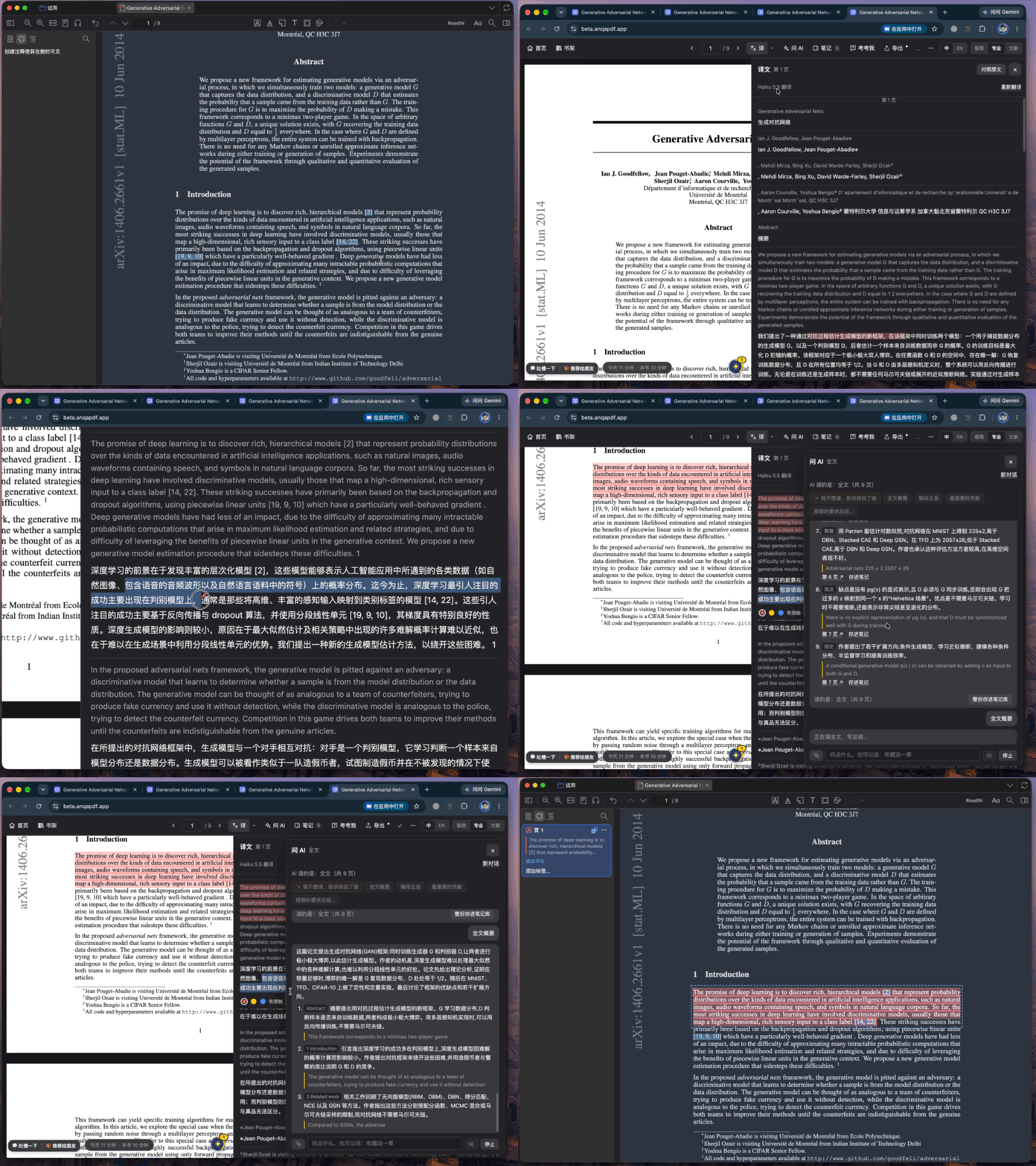
A free Zotero plugin. Right-click a paper to read it in ReadIN with a full-page side-by-side translation and have the AI tell you what it says. Your highlights and thoughts go back to Zotero, and your library stays where it is.
Set up in three steps
1Download the plugin
↓XPIreadin-yidu.xpi
Click the button. A file called readin-yidu.xpi lands in your Downloads folder.
Open Zotero, choose Tools → Plugins from the menu, and drag the file into the window. When “ReadIN 译读” shows up in the list, it's installed.
Can't find Tools? On a Mac it's in the menu bar at the very top of the screen; on Windows, at the top of the Zotero window.
Won't drop (you see a 🚫)? Click the gear ⚙ at the top right of that window, choose Install Plugin From File…, and pick the file you downloaded.
3Open ReadIN
beta.anqapdf.appAccess your local network?BlockAllowConnect Zotero
Click the button in Chrome or Edge (Safari on the Mac can't connect to Zotero). ReadIN opens with AI ready. Click “Connect Zotero” at the top; when Chrome asks about your local network, click Allow.
Used ReadIN before? Choose Literature at the top right, then “Connect Zotero” on the shelf.
Right-click a paper in your library and choose Open in ReadIN.
ReadIN
Already reading it in Zotero? Click ReadIN at the right of the toolbar.
Keep Zotero open while you read.
In beta: no sign-up, nothing to fill in. Places are limited each month. Without one you can still read, highlight and sync back to Zotero, just without AI.
Why use it
Full-page side-by-side translationNo selecting sentence by sentence. Highlight a sentence in the translation and the matching sentence in the original is highlighted too.
“Tell me what it says”The AI explains the paper and pulls out key points; click one to jump to the sentence.
No API keys to set upNo OpenAI or Claude keys, no settings. Use the link above during the beta.
Mind map exportThe AI turns your highlights and thoughts into a foldable mind map.
Ask AI anywhereSelect any sentence and ask: terms, long sentences, what a passage does in the paper.
Your library stays in ZoteroHighlights and thoughts become native Zotero annotations; AI notes are saved as a child note.
Translated PDF back into ZoteroExport a translated paper as a PDF with the original layout (figures and formulas untouched), or a side-by-side PDF, saved as an attachment under the same paper.
Good to know
Keep both open: ReadIN and Zotero talk directly on your computer, not over the internet, so both need to be open on the same computer. Highlights you add in Zotero come over the next time you open the paper in ReadIN.
Works with: Zotero 9 and 10, and Chrome or Edge on a computer (Safari doesn't let websites reach Zotero on your computer). In mainland China, use the China version and download the plugin here.
Updates: the plugin updates itself — each time Zotero opens it checks for a new version and installs it, no restart needed. To update right away: Tools → Plugins in Zotero, click the gear at the top right, then Check for Updates.
Privacy: the plugin answers only ReadIN's own pages. Its only internet request is the update check (asking readin.cc whether there's a newer plugin; none of your papers or notes are sent). Open source on GitHub, no obfuscation, no tracking. When you use AI features, the text you translate or ask about goes to the AI through ReadIN's service.
Price: the plugin is free. ReadIN will have a free tier with paid plans for heavier use.
Get in touch
Write to [email protected], or use Feedback at the bottom left of ReadIN.
This plugin is not affiliated with or endorsed by Zotero. Zotero is a registered trademark of the Corporation for Digital Scholarship.
ReadIN 译读:Zotero 裡的論文,用 ReadIN 讀
免費的 Zotero 附加元件。對一篇論文按右鍵,就能用 ReadIN 整頁中英對照閱讀、讓 AI 講這篇在說什麼;螢光標記和想法會自動回到 Zotero。文獻不用搬家。